Product workflow demo · Isolated local environment / Fictional data
Create an identifying entity record, then find it again
Start with the name you currently know, check similar entities, create a record, then view its details and search by name. This is a tested entity management workflow, not a complete register import process.
The demo uses “Local Fictional Demo Entity-63dfa201”, which is not a production customer or an actual enterprise or trademark right. The screenshot comes from real operations in an isolated local product environment, not a designed mockup.
Distinguish register preparation from entity creation
First, use the Register template and completion guide to organize original entity names, sources and items to verify. Then follow the demo below to understand how to create an identifying entity record in the product; this does not upload a workbook to the system.
The template does not support one-click import. This page does not demonstrate register import, source verification or a complete rights-management workflow. Do not use the fictional spreadsheet examples as actual business records.
Actual workflow: Enter → Check → Create → View → Search
- Enter the name you currently know. In a signed-in workspace with the required permissions, open Entity Management, click + Add Entity and enter the demo name in Name currently known.
- Check similar entities first. Click Check and continue and read the results. In this test, the workflow proceeded to creation; this does not mean every name has no similar entities or establish unique identity.
- Create an identifying record. Click Continue to create identifying record. The actual creation request succeeded in this test and opened the new entity details. This only creates a record for later management; an unverified name is not a conclusion about legal qualification.
- View details and current gaps. Details show the demo name, Entity created and Under management. The same entity was also read through an authenticated API to verify that the name matched the record. The screenshot shows zero linked trademarks and procedures.
- Return to the list and find it by name. Click Back to entity list, enter the name and click Find. In this test, the list returned the created entity; this was not a search of an external trademark database.
Actual tested detail screenshot
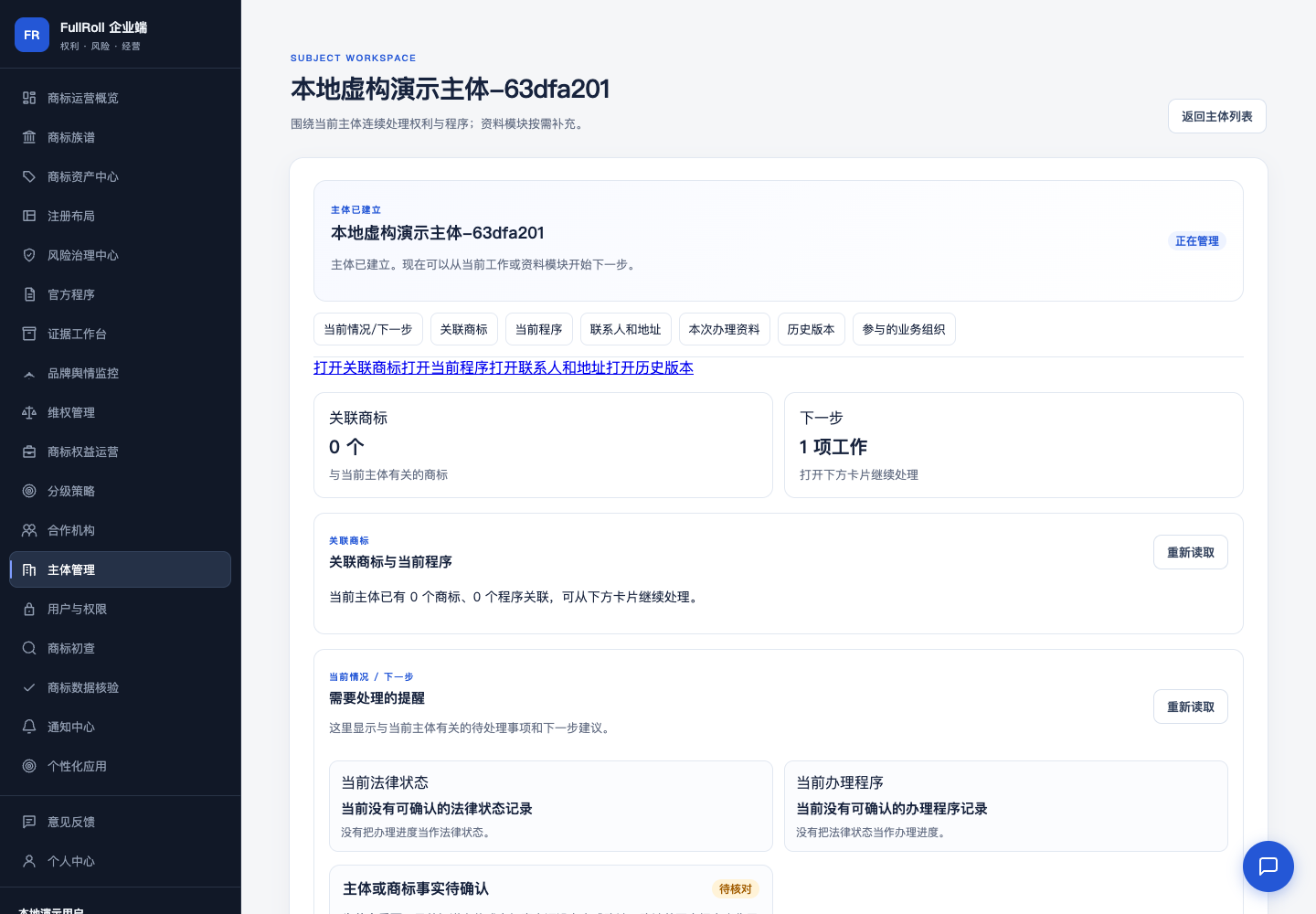
Entity created only means an identifying record exists. It does not establish identity qualifications, trademark rights or complete records. Sources must still be verified and documents added as the actual matter requires.
Base your next step on a real task
Still organizing records? Download the template and flag unknowns first. Ready to create entities? Start through the existing registration page or contact us to confirm the right workflow for your records and tasks. Registration, permissions and subsequent business operations are outside this demo.